
Table of Contents

Brij x Zendesk Integration
.png)
- For customers who never placed an order with the brand directly, their Brij registration becomes the only proof of purchase that exists.
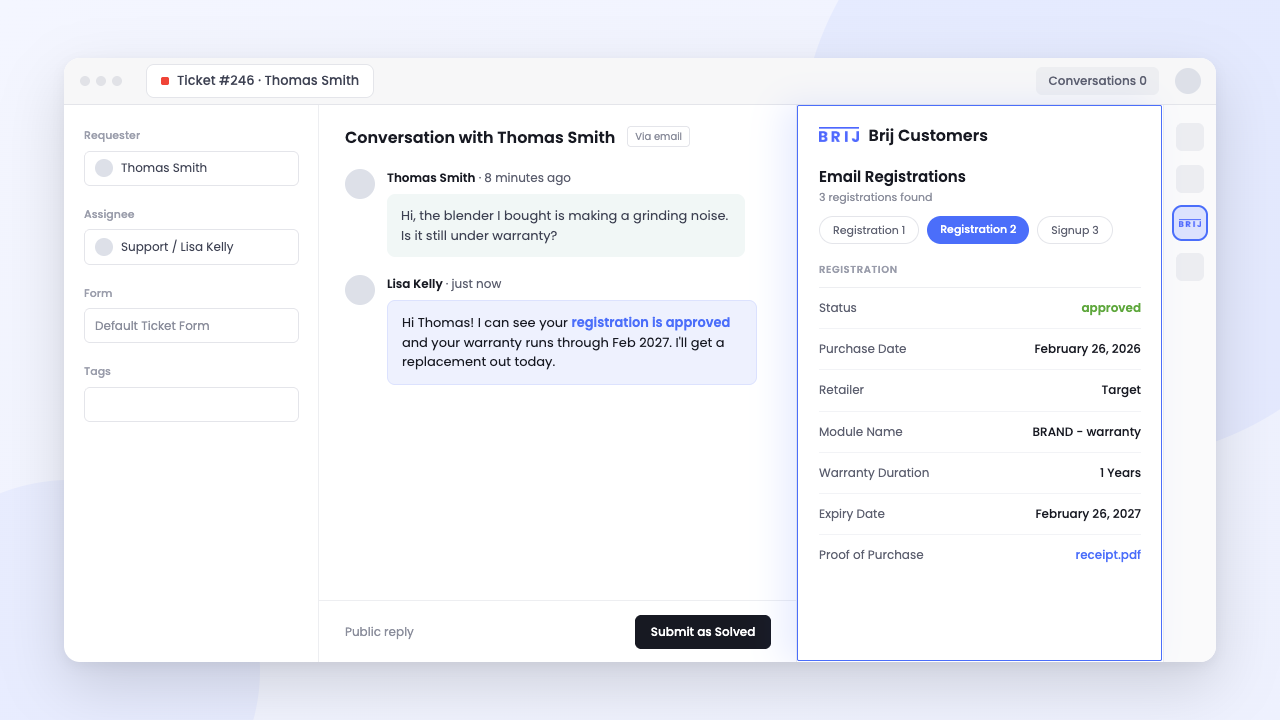
- The Brij + Zendesk integration displays a customer's product registration, warranty status, purchase details, and receipt upload directly in the Zendesk ticket sidebar, so agents can confirm ownership in the first reply.
- The app matches automatically by comparing the ticket requester's email to a Brij registration profile, so nothing displays unless a real match exists.
- Agents can verify retail and marketplace purchases directly inside Zendesk, closing warranty and ownership questions in one exchange.
When a customer buys directly from your site, your support team can pull up the order in seconds – name, email, SKU, shipping status, all sitting in the same system as the ticket.
When that same customer buys at Target, Walmart, or on Amazon, there's no order to look up. Your agent is staring at a blank field, and the only way to move the ticket forward is to ask the customer to dig up a receipt, screenshot it, and wait. That back-and-forth is the retail black box showing up in your help desk. The purchase happened, but your support stack has no record of it.
Brij closes that gap by turning retail and marketplace purchases into registration data your team already trusts, and now that data lives where support agents actually work. The Brij + Zendesk integration puts it directly in the ticket sidebar.
What Is Zendesk?
Zendesk is one of the most widely used customer service platforms that helps businesses manage support conversations across email, chat, phone, social media, and other channels. It gives support teams the tools to resolve issues faster, organize customer interactions, and deliver a more consistent service experience at scale.
Most omnichannel brands already run their support desk through it. What they're usually missing is any visibility into the 80% of sales happening outside their own site.
Verify Your Retail Buyers Directly in Zendesk
Brij's registration is often the only proof-of-purchase record that exists for non DTC customers: they scanned the code on the package, registered the product, and uploaded the receipt. That record now appears in the ticket, so an agent can confirm ownership in the first reply instead of asking for a receipt and waiting two days.
- No more "can you send a photo of your receipt?" Agents see registration and purchase details the moment a ticket opens.
- Warranty status at a glance. If a customer registered a product through Brij, the sidebar shows it, no separate lookup required.
- Faster first-response time. Agents resolve retail-purchase questions in the same motion as DTC ones, instead of pausing the ticket to wait on the customer.
- PII stays controlled. Access can be restricted by role or group, so only the agents who need registration data can see it.
How the Brij + Zendesk Integration Works
- Connect your Zendesk account inside Brij's integration settings.
- Choose what surfaces. Configure which customer, registration, product, and warranty registration details should appear in the sidebar.
- Install the Brij Customers app as a private app in Zendesk Admin Center (not a marketplace listing), using the API key and base URL your Brij account manager provides.
- Set access controls, optionally restricting the app to specific agent roles or groups.
- Open a ticket. If the requester's email matches a Brij registration, their product, warranty, and receipt data appears in the sidebar automatically. If it doesn't match, nothing displays, no dead ends, no false positives.
Read the full how-to guide for installing the integration here.
Use Cases
- Warranty disputes. An agent confirms a customer registered their product and what warranty terms apply.
- Order verification for retail purchases. A customer says they bought at Target; the agent confirms it instantly instead of taking their word for it.
- Proactive education. Agents reference the setup guide or survey responses a customer already interacted with, instead of re-explaining from scratch.
- Escalation triage. Support leads use registration and warranty status to decide whether a ticket needs a refund, a replacement, or just an answer.
- Cross-team handoff. The same data Brij surfaces in Zendesk also feeds marketing and retention, so a support interaction doesn't dead-end as a one-off fix. It's part of the same customer success loop.
Build a Stronger Support Experience
Support agents can't help customers they can't see. The Brij + Zendesk integration gives your team the same proof-of-purchase confidence for a Target sale that they already have for a DTC order, right inside the ticket they're already working. Brij turns those retail purchases into identity your whole stack can use, support included.
Explore the full list of Brij Integrations, or book a demo with Brij to see the Zendesk sidebar in action.
FAQ
What data does the app show in a ticket?
Brij registration data matched to the ticket requester's email — product registrations, warranty information, purchase details, the receipt upload if one exists, and any survey answers your registration flow collects. If the requester has no Brij registration, or their Zendesk email differs from the one they registered with, the panel shows nothing.
Is this on the Zendesk Marketplace?
No. It installs as a private app. Your Brij account manager provides a .zip file and your Brij API Base URL, and a Zendesk admin uploads it under Apps and integrations → Zendesk Support apps → Upload private app.
Can I limit which agents see customer data?
Yes. Zendesk role and group restrictions apply to the app, so you can scope it to the teams handling warranty and product tickets and keep registration PII away from everyone else.
Can I add a Zendesk chat widget to a Brij experience?
Yes, though that's separate from this app. Paste your Zendesk chat snippet into Settings → Custom Code in Brij and the widget loads across your experiences, so a customer can start a conversation without leaving the flow.