BFCM Webinar 9/28 | Tactical strategy on how to spend smarter & make every customer worth more
Hear from the experts

Support
Review customer product registration information directly within the Zendesk sidebar.

About the integration
Give agents proof of purchase for customers who never placed an order with you.

Zendesk is a customer service platform that helps businesses manage support conversations across email, chat, phone, social media, and other channels. It gives support teams the tools to resolve issues faster, organize customer interactions, and deliver a more consistent service experience at scale.
Verify ownership for buyers with no order record
Warranty status, purchase details, and receipt in the sidebar
Restrict access by agent role or group
WHY INTEGRATE
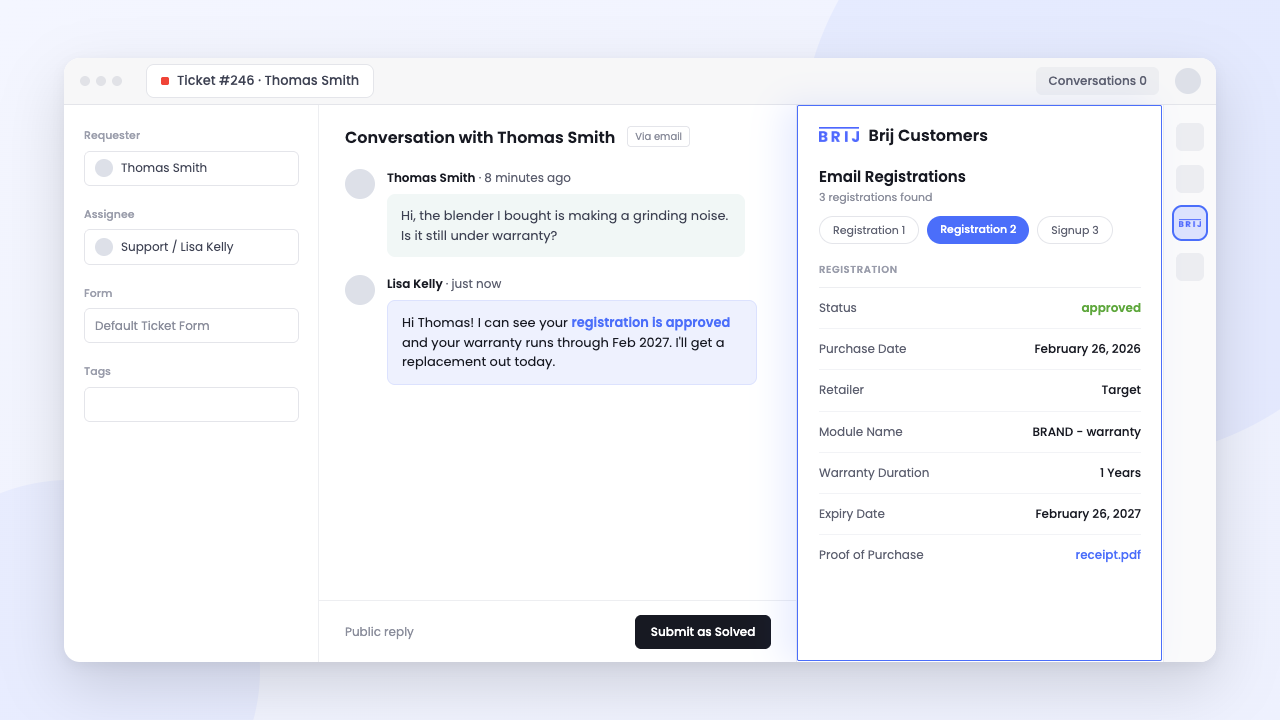
When a customer buys from your site, your agents can look up the order. When they buy at Target, there is no order to look up, causing stalled tickets with customer back-and-forth. Brij's registration is often the only proof-of-purchase record that exists for those customers: they scanned the code on the package, registered the product, and uploaded the receipt. That record now appears in the ticket, so an agent can confirm ownership in the first reply instead of asking for a receipt and waiting two days.
Read More →HOW-TO GUIDE
Follow the steps below to get started.
Visit Brij’s Integrations settings and authorize Zendesk access.
Choose where Zendesk support appears and which customer, registration, product, and warranty details are shared.
Submit a sample support request, confirming the ticket and customer context appear correctly in Zendesk, then enabling it for customers.
What data does the app show in a ticket?
▾Brij registration data matched to the ticket requester's email — product registrations, warranty information, purchase details, the receipt upload if one exists, and any survey answers your registration flow collects. If the requester has no Brij registration, or their Zendesk email differs from the one they registered with, the panel shows nothing.
Is this on the Zendesk Marketplace?
▾No — it installs as a private app. Your Brij account manager provides a .zip file and your Brij API Base URL, and a Zendesk admin uploads it under Apps and integrations → Zendesk Support apps → Upload private app.
Can I limit which agents see customer data?
▾Yes. Zendesk role and group restrictions apply to the app, so you can scope it to the teams handling warranty and product tickets and keep registration PII away from everyone else.
Can I add a Zendesk chat widget to a Brij experience?
▾Yes, though that's separate from this app. Paste your Zendesk chat snippet into Settings → Custom Code in Brij and the widget loads across your experiences, so a customer can start a conversation without leaving the flow.
Start syncing your offline buyers and put every customer to work.